
Ep. 46: Web Development Basics for Aspiring Vibe Coders
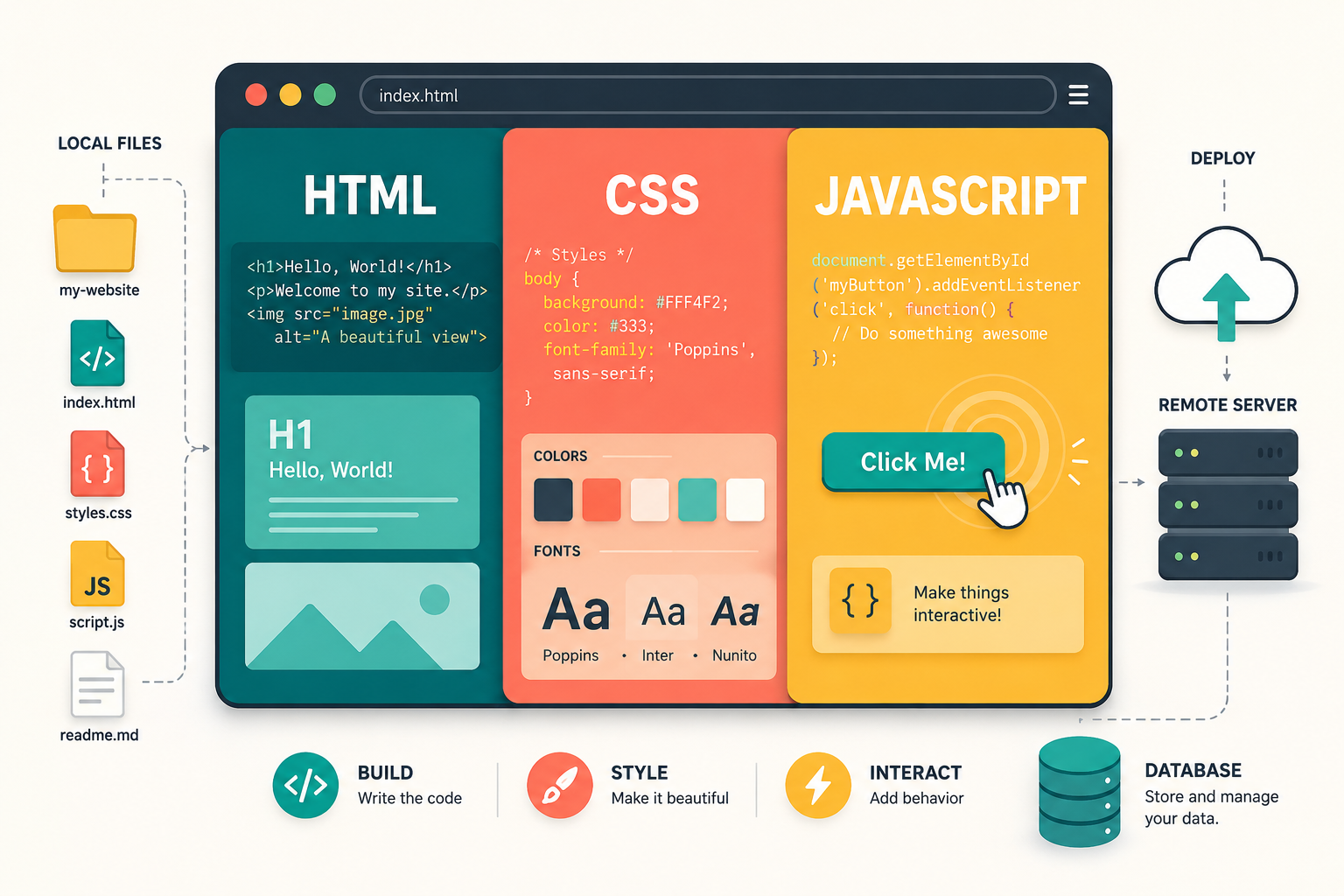
Let’s explore some development basics for aspiring vibe coders, shall we?! In this episode I break down what a web app actually is, explain HTML, CSS, and JavaScript in plain language, and get into two things that tend to get gatekept online: deploying your app so you can use it from anywhere, and setting up a database. It’s not the sexiest stuff to learn, but it’s super helpful to learn some of these basics instead of just asking Claude to make stuff and hoping for the best.
The Curmudgeonly Coders
Fair warning: this episode is going to be slightly technical, but more so in the sense that I’m going to be explaining “technical terms”, not that it’s going to be some super technical, impossible-to-understand episode.
I’ve been playing around with this vibe coding stuff since last December, and when I sat down a few weeks ago to make the outline for my vibe coding workshop, it really showed me how helpful it was that I took the time to learn some web development basics instead of just asking Claude to make stuff and hoping for the best.
The terrible AI silos on Threads are full of curmudgeonly coders, who seem to have an endless amount of time and energy to just shit on vibe coding and rant that if you use AI to build you’ll never be an actual coder and all of your stuff is going to break. Two things:
- That is objectively tacky behavior.
- That sentiment is objectively not true.
As a reminder, vibe coding is a term coined by Andrej Karpathy, co-founder of OpenAI, and it refers to telling AI what you want it to build and letting it handle everything.
The reality is, if you’re really in it and you’re vibe coding with any kind of consistency and regularity, you can’t help but learn some parts of coding and web development, it’s an inevitability. Will you be able to write the code yourself? Perhaps a small amount at best, but generally speaking, no. Will you have a basic understanding of the process taking place? Absolutely.
So what I want to do with this episode is give you a little bit of a head start on things and introduce some very basic web development concepts that are helpful to at least have a cursory understanding of as you embark on your vibe coding journeys.
What Is Web Development?
First up, a quick definition. Web development is the process of building and maintaining websites and web applications, everything from how something looks in a browser to how it stores and moves data behind the scenes.
Perhaps one day I’ll make a Part 2 to this where we talk about server-side vs. client-side, aka back end vs. front end, but for today, we’re just going to stay out of those weeds and just discuss the big rocks.
What Is a Web App?
Next definition: A web app, short for web application, is simply a website that does something. It has functionality. So, yes, your website is a web app.
The big thing I need you to understand here is that if you’re building something with AI that has functionality, a tool, a form, a dashboard, something that does something, you’re building a web app. It lives at a URL, you access it in a browser, and it’s not something you download from an app store.
I know when we hear the word app, we immediately think of our phone, but a web app is very different than a mobile app. A web app is a tool with functionality that lives at a URL that you access in a browser. A mobile app gets downloaded from the App Store or Google Play and runs natively on your device, and is completely different under the hood.
You will be vibe coding web apps. Your website is a web app. Anything you build will be a web app. And yes, you will be able to access it from your phone. MOAR on that in a minute.
HTML, CSS, and JavaScript
Now let’s talk about three terms you’ve likely heard: HTML, CSS, and JavaScript. The quick and dirty is that these three things are programming languages that work together to turn a blank screen into a functioning webpage.
A programming language is simply a set of rules that a computer can read and act on. Different languages have different rules and syntax ( think of syntax like grammar) and are designed to do different things.
Here’s what each one does:
- HTML — controls what exists on the page (text, images, buttons)
- CSS — controls the styling of the webpage and how it looks (colors, fonts, spacing)
- JavaScript — controls what actions you can perform on the webpage (what happens when you push a button)
It’s helpful to have a basic understanding of these three things, particularly for troubleshooting or when looking to change or fix something on a webpage yourself. Having this basic knowledge allows you to ask for specific things from AI and not have to go back and forth as much.
I manage both of my websites myself, I build out my sales pages, I have a bunch of personal web apps that I’ve developed, and having a basic understanding of what these three things simply are has been really helpful.
The Files are IN the Computer?!? (No More Gatekeeping)
Time to piss off the curmudgeonly coders. The last two things I’m going to go over have more to do with the functionality of your web apps and making it so you’re not relegated to only using them on the computer you built them on. This right here is hands-down the biggest thing I see gatekept in those whack innanet streets.
When you vibe code a web app, your AI of choice (mine is Claude Code) is creating folders and files on your computer that contain HTML, CSS, and JavaScript. The browser (Chrome, Safari) will then read those files and use them to assemble the web app. (Remember: a web app is a tool with functionality that lives at a URL that you access in a browser.)
Translation: Chrome is reading the files that are on your computer. Yes, the files are literally in the computer. But what happens if you want to access this web app on your phone, your laptop, or a different computer? The issue you’ll run into is that the browser on that phone/laptop/other computer doesn’t have access to the files that are on the specific computer you used to build the web app, so you’re SOL.
The solution is deploying.
Deploying means taking your files that have the HTML, CSS, and JavaScript that make up your app, and uploading them to a remote server that’s always on and connected to the internet. A URL is then attached to that server so you can type that address into a browser and the browser can access those files at any time.
If you do not deploy your web app (meaning you don’t put the files on a remote server) then you will only ever be able to use that web app on the computer where its files live.
I’m not going to go through the how-to of deploying a web app, but the hosting platform I use to deploy all of my web apps is called Vercel. If you’re looking to deploy your web app and be able to use it from anywhere, simply ask Claude how to deploy it with Vercel.
Yes, there are other hosting platforms out there, but I use Vercel because it integrates seamlessly with all of the other things I use for my web apps.
Remembering Information Across Sessions
Last thing I’m going to go over: a database. We all know what a database is, but a quick little definition for ya, it’s a place to store stuff.
If you want or need your web app to remember things across sessions, like information about a client, or the last time you took a dose of medication, you’ll need a database attached to your web app. My preferred and recommended database provider is Supabase. It integrates very nicely with other things I use to build my web apps, and for those of you thinking you might want to build something that other people use, it has built-in authentication and authorization capabilities (translation: each user has their own private data).
I’m not going to go into how to set up Supabase or how to integrate. Again, just tell Claude that you want to use Supabase as the database for your web app and it will walk you through it. I just want to put Supabase on your radar so you know you need a database in the first place, and so that you don’t have to go searching for which one to use.
How I Used AI This Week
Each episode I share a quick example of how I used AI that week.
This week I used AI to vibe code a blur privacy tool Chrome extension…and it didn’t work!
Quick definition first: A Chrome extension is a small program that runs inside your Chrome browser and adds functionality to it.
I actually didn’t need Claude Code for this and was able to whip it up with regular Claude. I was looking to do a screen recording of my custom dashboard that I use for my messaging clients and I wanted to blur out names and sensitive info. These extensions do already exist, but some you had to pay for and I didn’t want to pay, and also I’m always just curious about what I can “build.” So I asked Claude about the project, and it told me I didn’t even need to use Claude Code and that it could generate the necessary files for me, and the whole thing would take less than 30 minutes.
So I told Claude what I needed, it built the files, and it told me how to upload it to Chrome dev tools and launch it. Like Claude promised, it was actually a very quick process, but it only half worked. The blur tool worked perfectly on my regular websites, but only had partial functionality on my dashboard. On my dashboard, it would blur, but then once I navigated away from that page to a different part of the dashboard and then navigated back, the blurs were gone. After a bit of digging I realized that this was because of the framework I used to build the dashboard. If I had wanted to spend more time, I probably could have figured it out, but I found a free extension that did work and just used that instead.
Sharing this story of half-success half-failure this to introduce Chrome extensions because they’re pretty cool, and also to highlight the fact that not all builds go according to plan. Often times the thing that takes the longest is troubleshooting, and sometimes it’ll have you just walking away from the tool altogether.
Da Wrap-up
I know this episode was a bit more technical than the norm, but this stuff is genuinely helpful when you’re vibe coding. Knowing what a web app is, how HTML, CSS, and JavaScript work together, and the difference between local and deployed gives you the vocabulary to actually work with AI instead of just hoping for the best
As always, endlessly grateful for you and your curiosity.
Catch you next Thursday.
Maestro out.