
Ep. 42: Google Apps Script: Build Your Own Automations for Free
In this episode, I break down one of my favorite tools, Google Apps Script, Google’s free, low-code automation platform that has been built into Google Workspace since 2009. I cover what it is, a simplified version of how it works, and a non-exhaustive list of things you can actually build with it, including how to use AI to write all the code for you. The episode was inspired by a genuinely cool real-world use case from my friend and client, Dr. Ali Marty, who uses Google Apps Script as part of her coaching workflow. The best part? It’s all FREE! Tune into the full episode for all the deets.
Inspired by Disney
Today we’re talking about one of my favorite platforms for automating tasks: Google Apps Script.
I’ve written about Google Apps Script in previous posts because I’ve used it for some of my own projects, but the inspiration for this one was a recent conversation with my girl Ali Marty, aka Dr. Disney, aka @rundisneydpt on IG. We were Voxering and shared how she’d been using Google Apps Script as part of her coaching workflow, and I was like, I gotta do a full episode about this tool because it’s just so damn good.
Where AI Actually Fits In
Worth noting upfront: Google Apps Script isn’t AI in and of itself. It does have integration with Gemini and Vertex (Google’s AI platforms) but where AI actually comes in, and how I’ve used it extensively, is to have your AI model of choice write the code that Google Apps Script will use in order to execute whatever automation you’re cooking up.
There’s a good chance you’re reading along right now (love you for this) but have no idea wtf I’m talking about with all this Google Apps Script stuff, so I’m gonna start at the beginning.
What Is Google Apps Script?
Right off the bat, I’m such a fan of Google Apps Script for two reasons: 1 – It’s FREE, and 2 – It’s native to and works within an ecosystem I’m already hugely familiar with and use all the time: Google Workspace.
Something that really helped me understand wtf Google Apps Script actually was, was breaking down the name:
- Script = a list of instructions; you write them once and the computer follows them every time
- Apps = any of the tools within the Google ecosystem — Docs, Sheets, Slides, Forms, Drive, Gmail, Calendar — they’re all apps
Put it together: Google Apps Script = instructions you write to make the Google tools do things automatically.
Google Apps Script is Google’s original low-code automation platform. It allows you to build applications that customize the Workspace experience. Google’s goal in creating it was to make it as simple as possible to augment the power of Google Workspace for whatever use case someone might have.
Fun fact: Google Apps Script was originally developed in 2009, and since then Google has been deeply integrating it into the Google Workspace experience, which means it can do a lot.
The simplified summary: Google Apps Script is a platform within Google Workspace that allows Google apps to talk to each other and do things automatically.
How Google Apps Script Works
Without getting too techy, I’m just going to share what I think you’ll actually care about as it relates to how this thing works.
Google Apps Script is based on JavaScript, the OG coding language. Thankfully, you don’t need to know how to code in order to use it, because you can just tell your favorite LLM what you’re trying to do and it will generate the code for you. What a time to be alive.
At its heart, Google Apps Script a browser-based code editor. Think of it like a blank document, but for code:
- A sidebar on the left that shows you your project files
- A main area that’s a giant text field where you paste or write your script
- A toolbar at the top with a run button, a save button, and a dropdown to select which function you want to run
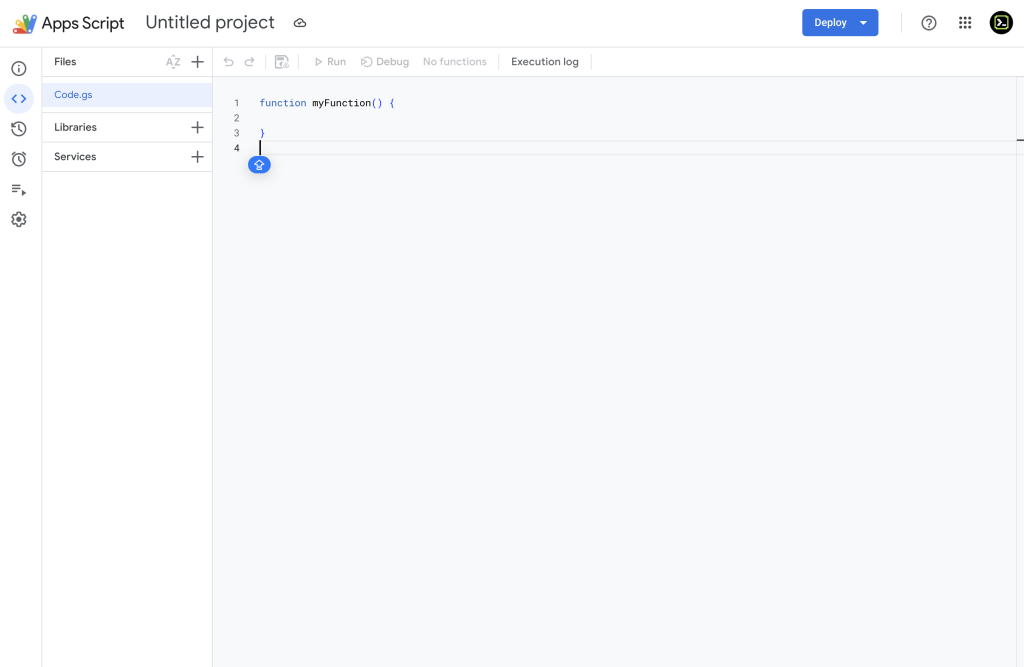
Accessing it: If you’re already inside any Google app, go to Extensions → Apps Script and it opens in a new tab. If you’re not inside a Google app, head to script.google.com, log in with your Google account, and you can create a new standalone script from there.
Anyone with a Google account has access to Google Apps Script, including folks with just a free Gmail account.
The scripts (those instructions that you had the LLM write for you) run when triggered, either manually, on a schedule, or when something happens (like a form submission or a file being added to Drive). You set the parameters.
What Can You Actually Build?
In many ways, the sky is the limit when it comes to building out automations with Google apps Script inside of Google Workspace. Daily quotas do exist (Google limits how much your scripts can run in a given period) but the quotas are generous and only become a real issue if you’re automating at scale (think: processing thousands of form submissions in a day or sending hundreds of emails in a short window).
Here’s a non-exhaustive list of what you can do and build:
Within Google Workspace:
- Create a new Google Doc or folder in Drive based on a trigger*
- Auto-forward emails based on certain criteria*
- Send a weekly summary email pulled from Sheet data
- Send an email automatically when a Google Form is submitted
- Auto-sort or filter rows in a Sheet when new data comes in
- Add a custom menu to a Sheet or Doc with your own buttons*
- Create calendar events from rows in a Sheet
- Rename files in bulk based on a naming convention
- Generate a weekly report Doc from Sheet data and email it
Connecting Google to Other Things:
- Pull data from an external API and populate a Sheet*
- Send data from a Gmail to an external API*
- Fetch data from an external URL and display it in Sheets
Content Creator Specific Uses:
- Create episode tracking sheets that update automatically
- Build a content calendar that populates from a sheet
- Send yourself a digest email of everything you need to do that week
*denotes ways that I personally have used Google Apps Script
I realize none of it is super sexy, but these tasks can be genuinely helpful…and they’re FREE!
Best Bet: Ask the Robot
I realize that Google Apps Script still may have you scratching your head, but if you’re even in the least bit interested, your best bet is to chat with your favorite LLM about what you’re trying to do, and then have it lay out all the steps and generate all the code.
My goal with this episode wasn’t to turn you into a Google Apps Script ninja, it was simply to make you aware that Google Apps Script exists so that you can ask your favorite LLM whether or not it would be the best tool for whatever problem you’re trying to solve or task you’re wanting to automate.
Like I’ve written in almost every episode, the best way to understand this tool (and AI in general) is to simply give it a try.
How I Used AI This Week
Each episode I share a quick example of how I, or someone in the audience, used AI that week.
As I mentioned at the top of the episode, this Google Apps Script topic was inspired by how my homie, Dr. Ali, has been using it in her coaching business, and she gave me her blessing to share her brilliance with all of you fine folks.
Dr. Ali creates RunDisney training plans and she sends her clients their weekly training via Google Spreadsheet. The Disney Magic: She created a Google Apps Script that takes what’s on the Sheet and blocks it out on their calendar!!!!
So for example: a programmed 10-mile run at 15 min/mile pace gets blocked out as 150 minutes on the clients calendar. Annnnnd, all of the directions she put in the Sheet for them ( how long it will take them, what they need to do, their paces, etc) show up in the event description space on the calendar.
Yes, all of this requires that the client grant permissions, but what a cool use case for Google Apps Script.
But wait, there’s more! Folks can leave her notes in their Google Sheet, and she has set up another Google Apps Script so that at the end of the day all of the notes that clients have left her get sent to her in a summary email!
Incredibly, incredibly, incredibly cool. AND IT’S FREE!
Da Wrap-up
Google Apps Script has been quietly doing the heavy lifting inside Google Workspace since 2009, and with AI writing the code for you, the barrier to entry is pretty much gone. It’s free, it’s powerful, and the biggest thing to take from this episode is simple: know it exists. Ask your LLM if it’s the right tool for whatever you’re trying to automate, then let it lead the way.
As always, endlessly grateful for you and your curiosity.
Catch you next Thursday.
Maestro out.